Virtual wellness challenges for remote and hybrid teams
Bring remote workers together when they never share an office. Run a virtual step challenge, virtual walking challenge or virtual fitness challenge from one app. Everyone joins from their own phone, in their own time zone and language, with any wearable or none. Teams compete by country, office or department, and the challenge chat keeps it social.


★★★★★
4.7 on Capterra · 4.9 on the App Store
Ranked on average per person
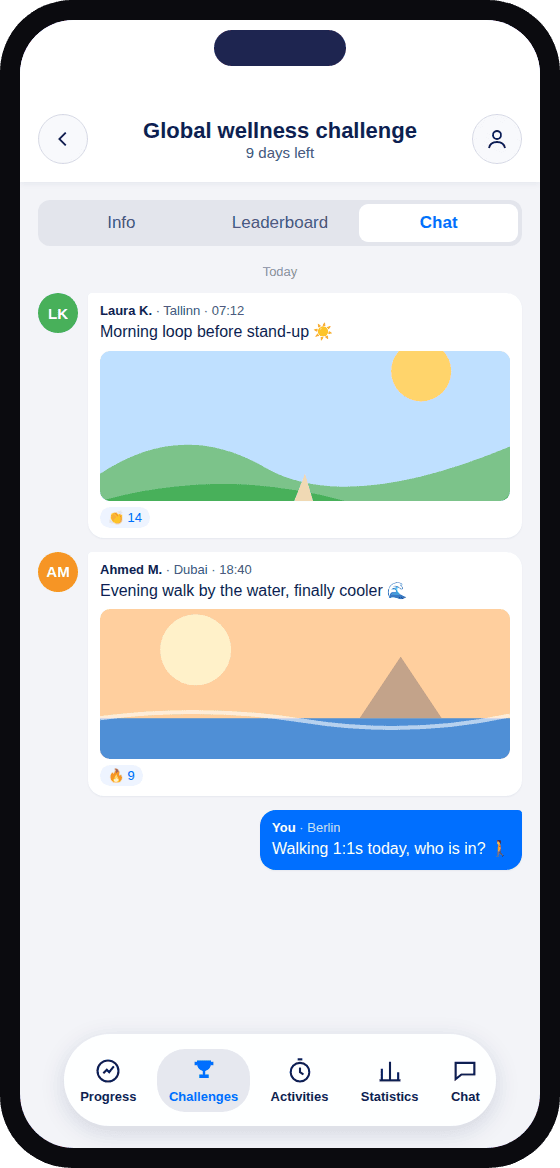
The challenge chat keeps it social
Teams at these companies have run challenges on YuMuuv








Small offices and big ones, on one leaderboard
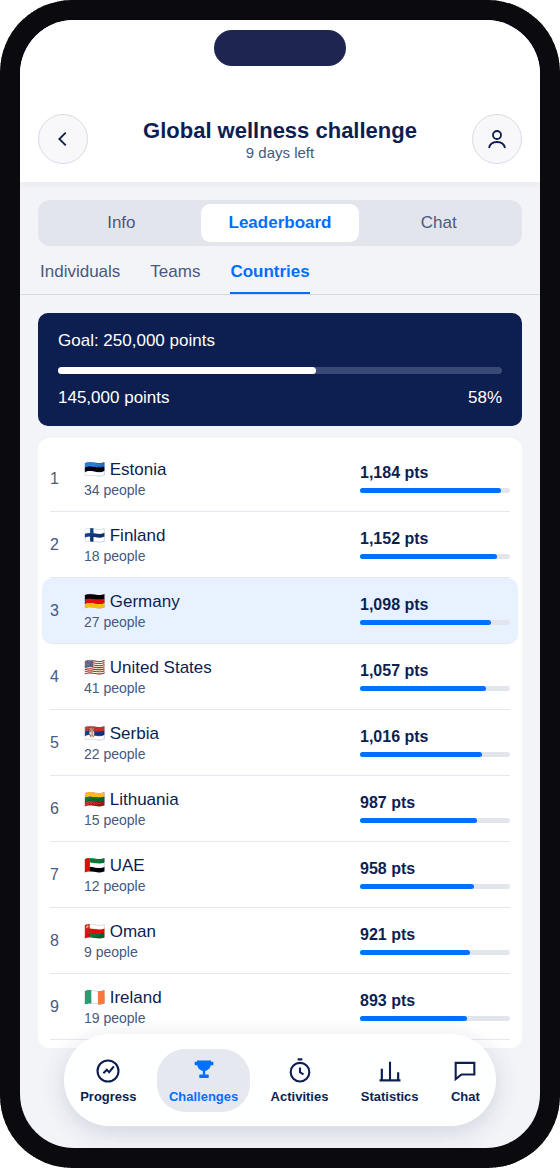
In a remote company, offices and countries are rarely the same size. Teams are ranked on average per person, so 18 colleagues in Finland can take on 41 in the United States. Switch the grouping to see the same people ranked three ways.
- Group by country, office or department, or use several at once
- Everyone also has a personal ranking
- 50 languages, so everyone can use the app in their own
Global wellness challengeExample company of 197 people, week 2
Example figures for illustration.
Everything a virtual team challenge needs
Remote colleagues miss the small moments of an office: the chat by the coffee machine, the shared walk at lunch. A virtual challenge gives them something to do together and talk about.
A chat for every challenge
People post photos from their walks and cheer each other on, from Dublin to Dubai.
Teams that cross borders
Group people by country, office or department, or mix them so colleagues who never meet end up on the same team.
Your time zone, your language
Everyone’s day is counted where they are, and the app is available in 50 languages.
No equipment to post
People join with the phone they already have. Wearables sync if they have one.
Not only steps
Run a remote fitness challenge, or sleep, mindfulness, water and wellness points challenges that fit a home-office day just as well.
See all wellness challenges →One dashboard for HR
See sign-ups and participation by country or office as the challenge runs, and export the results.
Easy to join from anywhere
Works with what people already wear
Connect once and steps, distance and workouts sync on their own. For sleep, water or mindfulness, logging takes one tap.
Works on iPhone and Android.










A person from our team helps you
Your success manager helps you plan a challenge across countries and time zones, answers your questions and is there when something comes up. You stay in control in the admin dashboard.
 KeitlinCustomer Success, YuMuuv
How global teams use YuMuuv
to go live, vs a 1.7-month category average
user adoption, vs a 51% category average

“People send photos of their walks — lovely morning walks on the beach, or with their dogs in the park … It’s really become part of our work culture.”


“YuMuuv has given us the opportunity to bring healthier ways of living to our employees in a fun and innovative way!”


“We wanted to create a challenge where it’s easy to participate … these steps are not walked alone.”


“YuMuuv makes organizing wellness challenges easy for companies with a global footprint across multiple countries and departments.”
Your challenge, from start to finish
Four stages, and you stay in control of each one.
Plan
You and your success managerChoose the challenge, dates and goal, and how teams are split across countries or offices.
Announce
YouInvite everyone by email or with one link, wherever they work.
Take part
Your peopleThey join from their phone, in their own time zone. The chat keeps everyone talking.
Wrap up
YouCelebrate, export the results for leadership, and line up the next one.
Rated by HR teams and employees in 100+ countries
 4.9/5
4.9/5 4.6/5
4.6/5 4.7/5
4.7/5 4.6/5
4.6/5 4.7/5
4.7/5Ready for your IT team, open to everyone
 SOC 2 Type II
Security controls independently audited.
 WCAG 2.2 AA
Accessible for colleagues who use screen readers, larger text or other assistive tools.
 GDPR compliant
Compliant with the EU’s data protection rules.
Each person uses the app in their own language and time zone. One dashboard for HR.
Before you book a call
16 answers in four topics. Choose a topic to see its questions.
Getting started
What is a virtual wellness challenge?
A wellness challenge that people take part in from wherever they are. Everyone tracks their activity or habit in the app, and teams compete on shared leaderboards without needing to meet in person.
Which virtual challenge works best for remote teams?
A step or walking challenge is the easiest start, because anyone can join with just a phone. Sleep, mindfulness and wellness points challenges also fit a home-office day well.
How long should a virtual challenge last?
Two to six weeks works for most teams. Four weeks is a common choice: long enough to build a habit, short enough to keep the energy up.
How much work is it for HR?
You set up the challenge in the admin dashboard and invite people by email or with a link. A success manager helps you plan the first one. On G2, customers report going live in under a month on average.
Remote and global teams
How do time zones work?
Each person’s activity is counted in their own time zone, so their day runs from their midnight to their midnight. Nobody is cut off early because of where head office is.
Can we set up teams by country or office?
Yes. Group people by country, office, department or your own mix. Teams are ranked on average per person, so small offices can compete with big ones.
Which languages is the app available in?
50 languages, on the web, iOS and Android. Each person can use the app in their own language.
How do remote colleagues stay connected during the challenge?
Each challenge has a chat where people post messages and photos and react to each other’s progress.
Joining in
Do employees need a wearable?
No. The app counts steps on the phone, and habits like water or mindfulness are logged in a tap. People who have a wearable can connect it.
Which devices and apps work with YuMuuv?
Apple Watch, Garmin, Fitbit, Polar, Suunto, Apple Health, Google Fit, Health Connect and Google Health, plus iPhone and Android phones.
Can hybrid and office-based colleagues join the same challenge?
Yes. Everyone joins the same challenge whether they work from home, the office or on the road.
Can we run more than one challenge?
Yes. You can run as many challenges as you like during your period, one after another or side by side.
Security and cost
Is YuMuuv secure and accessible?
Yes. YuMuuv is SOC 2 Type II and GDPR compliant, and the app meets WCAG 2.2 AA accessibility standards. Security documentation is available for your IT team.
What can employees and HR see?
Colleagues see the leaderboards and the challenge chat. HR sees participation and challenge results in the admin dashboard.
How do we measure the results?
The admin dashboard shows sign-ups and participation by team, country or office during the challenge, and you can export the results for leadership.
What does it cost?
You pay only for employees who take part, with unlimited challenges during your period. See pricing or ask for a quote on the demo.
What could your remote team do together?
Pick a challenge and move the sliders. Sign-ups use YuMuuv’s 53% average adoption on G2. Steps use 8,448 a day, the average for a YuMuuv participant; the other challenges assume everyone who joins reaches a typical daily goal.
Want to plan it for real? In a 20-minute demo we show you the app, talk through teams across countries and go over pricing.