Health Connect
Health Connect allows you to share and sync data across multiple fitness apps and devices, including Samsung Health, Oura, WHOOP, and more. Find the full list of supported apps here.
Getting started with Health Connect is easy. If you're using Android 14 or newer, it's already built into the operating system. For Android 13 and earlier, download Health Connect from the Google Play Store.
Before connecting Health Connect with YuMuuv, make sure your activity app (Samsung Health, Oura, etc.) is set up to send data to Health Connect. You can find information on how to connect different activity apps to Health Connect here:
|
Pilt
|
Samsung Health |
|
Pilt
|
Huawei Health |
|
Pilt
|
Zepp (Amazfit) |
|
Pilt

|
COROS |
|
Pilt
|
Mi Fitness |
|
Pilt
|
Withings |
|
Pilt
|
Oura |
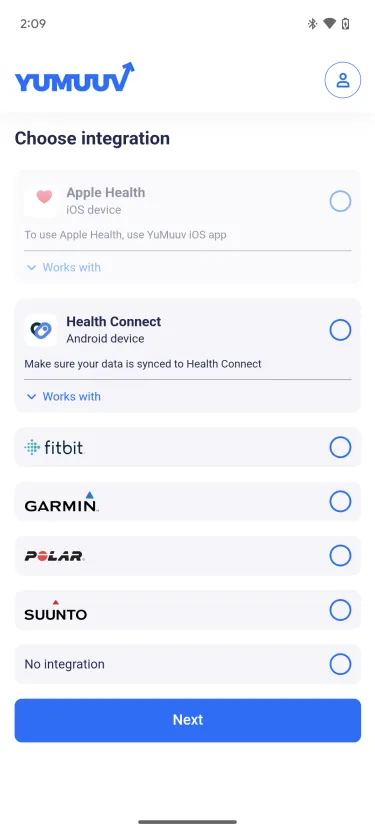
In the YuMuuv app, when you reach the Choose Integration page during sign-up, select Health Connect from the list.
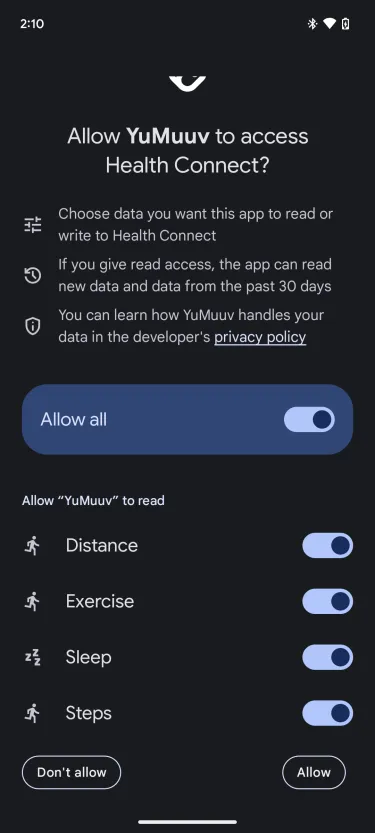
Now comes an important step—Health Connect will ask for permission to send activity data to YuMuuv. Be sure to grant these permissions, otherwise, YuMuuv won’t receive your activity data. Click Allow all and Allow in the bottom right corner and you're all set! Now your data will sync automatically with YuMuuv.
It’s that easy! If you have any questions or issues, feel free to contact us at support@yumuuv.com